Parent? Sign inSign in

Kitchen software for childcare centres and groups in Australia

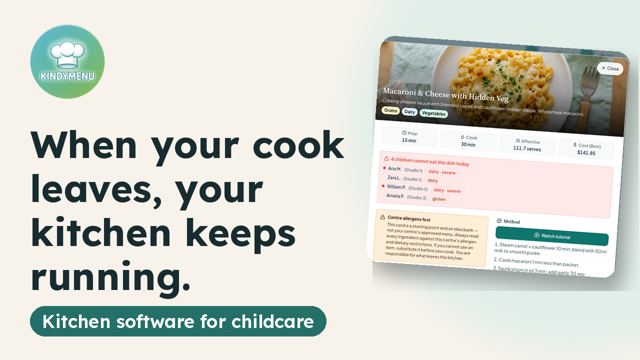
Your cook didn't come in this morning. Who knows which child has anaphylaxis?

In KindyMenu the menu, recipe cards and every child's allergies are already there. A relief cook sees it all from the first minute. The cook still checks allergies and swaps.

Start free trialSee the owner demo

30 days free. No credit card to begin. The demo needs no signup. Already have an account? Sign in
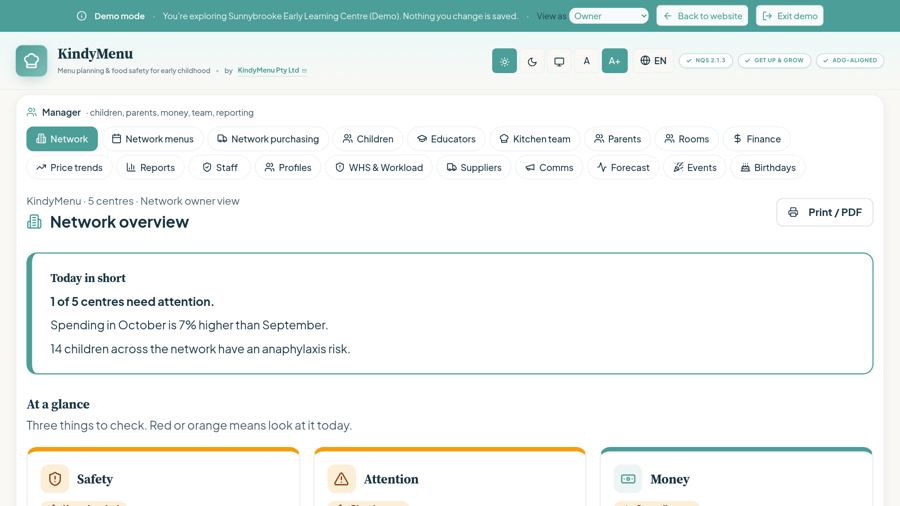
KindyMenu demo: Network overview screen

I am a…

Owner or operator

Food cost, allergies and open plates for every centre.

Network or area manager

Spot which centre needs a look before you visit.

Centre manager or director

Records with a name and a time, ready to print.

Executive chef, chef or cook

Recipe cards, allergy swaps and logs on the iPad.

Educator

What each child can eat, in your room.

Parent or guardian

Know what your child ate today. Your centre invites you.

See KindyMenu in 2 minutes

See KindyMenu in 2 minutes▶ Play video · 1:58 · Overview video, 1 minute 58 seconds

What happens to allergy records, kitchen logs and food cost when a cook leaves, and how KindyMenu keeps them with your centre. Nothing loads from YouTube until you press play.

Open it on YouTube · More videos on our YouTube channel

Every child’s allergieson the kitchen screen, before cooking. The chef still checks.
4-week menus313 recipes with weights and steps
Food costper child per day, for every centre
Records without paperkitchen logs keep working offline

Built in Queensland, with data stored in Australia. 9 languages for kitchen staff.

In the program

What is inside

Modules in KindyMenu, not a sample menu. Designed to support NQS 2.1.3, Get Up & Grow and ADG

Designed to support these standards. The centre and its staff remain responsible for the food.

313 standardised recipes · HACCP and Cook-Cool logs · Allergy-aware swaps · Weekly cost · 10 record registers · Works offline

Menus and recipes: plan once, cook the same way every day
  • 313 recipes with the weight per serve, the method, cook times and allergens
  • 4-week menu rotation; quantities scale to today’s children in each room
  • Prep sheet and a printable daily pack for the shift
  • Pin a YouTube video to a recipe card
Allergies and diets: every child’s needs in front of the cook
  • A per-child allergy and diet register
  • Today’s alerts by meal, with severe (anaphylaxis-risk) alerts marked
  • A swap suggestion for each child. The chef checks it before serving
  • Register sign-off
Food-safety records: no more paper on a clipboard
  • Temperature checks: fridge, freezer, cooking and delivery
  • Cook · Cool records, one per batch, printable
  • Daily and weekly cleaning checklists, ticked and signed
  • 10 record registers in one place, ready to print
Money and purchasing: see where the food budget goes
  • Food cost per child per day, from food invoices only
  • Kitchen food grouped like supermarket aisles, each item with date, supplier and amount
  • Stock on hand, shopping list, deliveries, waste and losses
  • Price trends for each ingredient across centres
Centre networks: every centre on one screen
  • Green, yellow or red for each centre, and which needs a visit
  • Network menus sent to centres as a suggestion
  • One supplier list, group orders and requests to buy elsewhere
  • Recall notices passed to centres, with their answers
Educators: answer parents about meals
  • See today’s menu and the allergy list for your rooms only
  • Mark how much each child ate
  • Tap a dish to see the recipe, photo and video
Parents: the week’s menu at home
  • Sign in only after the centre invites you
  • This week’s menu with photos, and the child’s allergy record, read-only
  • Centre Updates, free and read-only
  • Optional paid add-ons: Family Kitchen and Family Care Connect
Team and access: everyone signs in as themselves
  • Password plus a 6-digit code by email
  • Each person uses their own PIN on the shared kitchen tablet
  • 9 languages for kitchen staff
  • Works offline on the iPad; daily automatic backups
Full detail of each module

Recipes and swaps

  • Today. The day at a glance, and a prep sheet to print.
  • Recipes. 313 dishes. A cook can browse them and edit them.
  • Allergy and dietary alerts. Each child’s record, and a swap suggestion the chef checks.
  • Insights. Nutrition, the week’s cost, and a forecast.
  • Stock. What is on hand, the shopping list, receipts, deliveries and losses.
  • Comms. Messages, birthdays and events.
  • Works on iPad, phone and desktop. The kitchen can keep working when the Wi-Fi drops.

HACCP and registers

HACCP and Cook-Cool logs

  • On Today, one desk opens three jobs for the shift.
  • Temperature. Fridge, freezer, cooking and delivery. A monthly HACCP sign-off sits here.
  • Cook · Cool. One record per batch. Cook to 75°C. Cool from 60°C to 21°C within 2 hours, then to 5°C within the next 4 hours. Reheat to 75°C within 2 hours. A batch outside those times is discarded.
  • Cleaning. Daily and weekly surfaces. Tick the list and sign it.
  • The Records area holds ten registers: staff certificates, the food-safety course, thermometer calibration, pest control, staff illness, complaints, the menu on display, equipment, food recalls, and a review of the food safety program.
  • The Cook · Cool register can be printed.
  • The program refers to NQS 2.1.3, Get Up & Grow, the Australian Dietary Guidelines, National Regulations 78–80, and Food Standards 3.2.2 and 3.2.3.

Network overview

  • For the owner of several centres, an area manager, or a centre manager. It is under Manager, then Network.
  • It shows only the centres assigned to that login. It does not change the menu, and it does not send reports.
  • Money. This month’s other expenses across those centres, next to last month. The centre with the highest spend. Spend by category.
  • The centre you have open also shows invoices, the cost per child per day, and food waste.
  • Control. Each centre is green, yellow or red. Need a look means red or yellow.
  • Red means that open centre still has parent notes waiting. Yellow means it has not been opened on this device, or not in the last 36 hours.
  • A centre not opened on this device for 3 days is listed, so someone goes and checks the kitchen.
  • You can search, filter, and open one centre. You can print the board.
  • The open centre shows how many children are there, how many of them have an allergen, and how many parent notes are still open.

Parent portal

The parent portal

Sign in

Only if your centre has invited you. They add your email and send a link or a code. Without that, this page cannot sign you in. Then your password and a 6-digit code by email. The first time, the emailed code lets you set your password.

Menu

Free. This week’s dishes, with names and photos. The child’s allergy record, read-only. No HACCP here.

Centre Updates

Free and read-only. Announcements, older messages, and the centre’s phone and email. No new message from here.

Family Kitchen

Cooking at home. AUD 29.99 a month, GST included. A free trial comes first. One plan covers the five tools below.

Recipes

More than 300 recipes the centre already uses, with photos.

Meal Generator

A private 7-day menu for home. The parent can mark foods to avoid.

Shopping

A list from that week. Print it, or open a basket at Coles or Woolworths.

Scan Products

Scan a barcode. See the ingredients and allergens listed for that product, next to your child’s allergy record. Product data comes from Open Food Facts and can be wrong. Always read the label. You and your centre’s chef make the final call for your child.

My Ratings

Rate a dish or the week, with a short note. Kept for that family.

Family Care Connect

Not for every family. A face-to-face word with the chef, or with the educator, is not always possible. Parents are busy. Staff are busy. Important details get lost in the rush, and for a child that matters. This is for when a parent needs to speak with the chef who cooks for their child, and with the educator who is with that child each day. Meals, allergies, swaps, and how the child is eating. Not medical advice. Urgent health: contact the centre. A$119 a month, GST included. 30 messages that month, no rollover. 10 trial messages, once. Extra 10 for A$19, GST included. They do not expire. Your centre aims to reply within about 2 business days. Not for emergencies.

Money and purchasing

Food prices change every week. Keep your hand on the pulse.

KindyMenu tracks what each centre pays, item by item. See price trends and spot when a price jumps, so you can act before it costs you thousands.

See what every centre pays, then ask for a better price

KindyMenu shows what each centre pays each supplier for the same item, side by side. You negotiate with the full picture, and you see where to ask for a better price. For example, one centre pays A$6 and another pays A$5 for the same item. You can also build one order for several centres and send it yourself.

Example only, not a guarantee

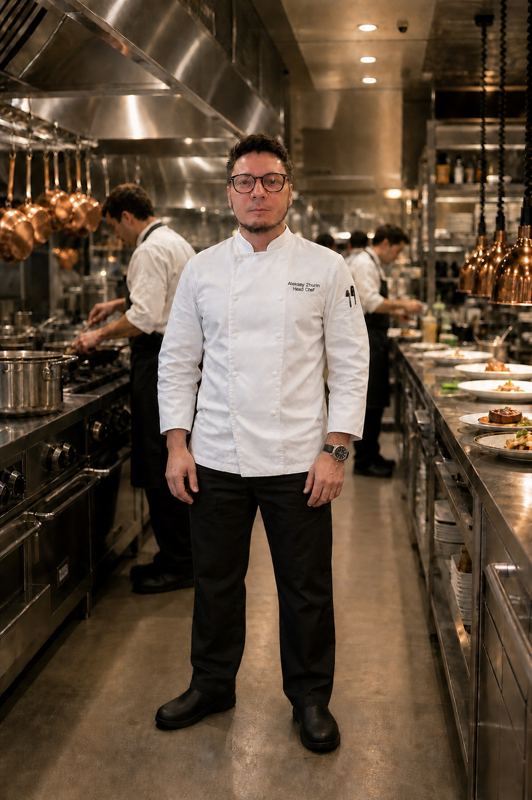
“From my own kitchen: a centre with 70 children spends about A$1,300 a week on food. That is about A$67,600 a year.”Aleksey Zhurin, Head Chef, 30+ years in food costing
10 centresA$676,000a year on food5% better prices: A$33,800
10% better prices: A$67,600
20 centresA$1,352,000a year on food5% better prices: A$67,600
10% better prices: A$135,200

Your own numbers will differ. KindyMenu shows the prices; it does not negotiate or place orders for you.

See centre prices in the demo

Kitchen consulting

Help in your kitchen, from people who run kitchens

Too much depends on memory and paper? Every lunch a rush?

A kindy kitchen is one connected system. We look at four parts of it, so your team gets more time, less stress, and everything visible.

We work alongside your chef and manager, not over them. Your chef knows the kitchen best. We help remove what gets in the way.

People and numbers

  • How many children you feed: portions, staffing and prep time planned for your real numbers
  • Meal times: a timetable the kitchen can keep, so meals go out on time
  • Team and parent communication: who tells the kitchen what, and when

Food and allergies

  • Allergies and diets: a clear path for each child’s meal, from delivery to the plate. The cook still checks.
  • Recipes and methods: written cards with weights and steps any cook can follow
  • Cultures and food preferences: menus that suit your families

Space and equipment

  • Kitchen zones: raw, cooked and allergen-free food kept apart
  • Equipment: what you need for your menu, and what you don’t
  • Storage: enough cold and dry space for your deliveries

Suppliers and checks

  • Suppliers: fewer, reliable suppliers with clear delivery days
  • Kitchen walk-through with your team: what already works well, and what would make the day easier

How it works

  1. 1. Email us your situationTell us about your centre, your kitchen or your plans.
  2. 2. On-site visit (or online meeting if you are far away)We look at the kitchen, the menu, the records and how the day runs.
  3. 3. Written planYou get a short report and an action plan, agreed with your team.

Example only

Before
  • Allergy details on paper in several places
  • The lunch timetable lives in one person’s head
  • One bench shared for raw and cooked prep
After
  • One allergy record the cook checks each day
  • A prep timetable for the real numbers
  • Separate zones for raw, cooked and allergen-free

Write to us about your situation

We prefer an on-site visit. The real picture is only visible in person: how the kitchen is organised, the processes, the people in the kitchen and the rooms, and how the manager runs it. Outside Queensland, or if you are far away, we start with an online meeting.

Email hello@kindymenu.com

No email app? Copy the address: hello@kindymenu.com

See consulting services →

See all 6 consulting services
Kitchen walk-through with your team
A walk through the kitchen: what is working, what is missing, what to fix first. A visit, not a council rating.
Menu and recipe cards
A menu written for the children there. Each dish gets a card: weights, method and steps a cook can follow.
Layout and equipment
Where benches, sinks and the cooking line should sit. Which ovens, fridges and small equipment you need.
Kitchen system design
How children, numbers, allergies, recipes, storage, suppliers and people fit together, so the day runs on a plan.
Kitchen design & zoning
Zones for delivery, storage, prep, cooking, serving and washing up, so people and food move one way.
New kitchen start-up
Opening a new centre? From the first plan to the first lunch: menu, equipment, suppliers, routines and training.

Consulting services are provided by KindyMenu Pty Ltd, by Aleksey Zhurin or a qualified consultant working with us. Consulting is separate from the KindyMenu subscription and has its own terms: Consulting Terms.

Aleksey Zhurin

Founder of KindyMenu

30+ years as a head chef · Food Safety Supervisor

Aleksey Zhurin, Head Chef

I spent more than 30 years in restaurants and hotels, as a head chef and as a group executive chef. I know how a professional kitchen is run, and what matters when food is prepared: a clear process, a record someone else can read, and no step left to memory.

Read the full story

After my child was born, I changed careers and went to work in a childcare kitchen. The work there was still on paper, written on a knee. Thousands of sheets, and they get lost. Handwriting is hard to read. You cannot tell who wrote what.

I looked for a program made for childcare kitchens. I did not find one in Australia or New Zealand. So I built KindyMenu myself. It follows the way a head chef thinks. The menu, the allergy, the cost and the food-safety record sit in one place. A cook can read them on the day, and a parent can see the week.

Write to Aleksey

Write to Aleksey

Published prices, ex. GST

All prices are in AUD and exclude GST. GST is added at checkout. A year is 10 times the month.

Solo
A$79 /month ex. GST

1 centre. Up to 50 children. Menu planner, food-safety modules, HACCP and cleaning. A year is A$790, ex. GST.

Most popularCentre
A$179 /month ex. GST

1 centre. Up to 200 children. Everything in Solo, plus more than one staff login with a PIN, and staff certificates. A year is A$1,790, ex. GST.

Multi
A$399 /month ex. GST

Up to 5 centres. No child limit. Everything in Centre, plus a centre switcher, group reports and price comparison. A year is A$3,990, ex. GST.

Enterprise
Custom

Custom quote, from A$799 a month, ex. GST. 6 or more centres. Email hello@kindymenu.com.

Swipe to see all plans →

Open the live pricing page

Free 30-day trial

Start with a free trial

No credit card to begin. If the trial ends without a paid plan, the service becomes read-only. Questions go to hello@kindymenu.com.

Start free trialTry the demo (no signup)Sign in

Parent or guardian? Parent portal

Try demoFree trial