Parent? Sign inSign in
Owner or operator

Your cook didn't come in this morning. Who knows which child has anaphylaxis?

In KindyMenu the menu, recipe cards and every child's allergies are already there. A relief cook sees it all from the first minute. The cook still checks allergies and swaps.

See the owner demoStart free trial

In the demo network

5centres
$2.02–2.32food per child per day
1menu standard
14children with anaphylaxis risk

Demo data, an example only.

What keeps owners up at night

Your cook quits for good. Years of know-how walk out.

Portions, swaps that work for each child, supplier habits: often kept in one head or a notebook.

With KindyMenu: Recipes with weights, swaps and logs are written down in KindyMenu. They stay with the centre, not with one person.

A child with anaphylaxis gets the wrong meal.

A serious incident means a report to the regulator, questions about your licence, worried families.

With KindyMenu: A swap for each child, which the chef checks before serving. Every check has a name and a time. KindyMenu cannot promise there will never be an incident.

Food cost creeps up and you see it a month late.

Five centres, five ways of buying, no clear number.

With KindyMenu: Food cost per child per day for every centre. Tap a centre to see what was bought, when, from whom.

Every centre buys from a different supplier.

Prices and quality change from centre to centre.

With KindyMenu: One menu and one order list for several centres. You choose the supplier and send it yourself.

The assessor arrives and nobody can find the folder.

The NQS rating is public. Parents look at it.

With KindyMenu: Menus on display, records and registers in one place. The director presses Print. It supports the visit; it does not decide your rating.

Why owners use it

See the owner demoStart free trial

Money and purchasing

Food prices change every week. Keep your hand on the pulse.

KindyMenu tracks what each centre pays, item by item. See price trends and spot when a price jumps, so you can act before it costs you thousands.

See what every centre pays, then ask for a better price

KindyMenu shows what each centre pays each supplier for the same item, side by side. You negotiate with the full picture, and you see where to ask for a better price. For example, one centre pays A$6 and another pays A$5 for the same item. You can also build one order for several centres and send it yourself.

Example only, not a guarantee

“From my own kitchen: a centre with 70 children spends about A$1,300 a week on food. That is about A$67,600 a year.”Aleksey Zhurin, Head Chef, 30+ years in food costing
10 centresA$676,000a year on food5% better prices: A$33,800
10% better prices: A$67,600
20 centresA$1,352,000a year on food5% better prices: A$67,600
10% better prices: A$135,200

Your own numbers will differ. KindyMenu shows the prices; it does not negotiate or place orders for you.

See centre prices in the demo

Menus built around Australia’s healthy-eating standards for childcare

Designed to support these standards. The centre and its staff remain responsible for the food.

What you get as an owner

For owners and multi-site groups

You can’t be in every kitchen. KindyMenu shows you all of them.

Risk and continuity

Protect your business from staff turnover

  • Kitchen screens in 9 languages.
  • Each person signs in under their own name on the shared kitchen tablet. You can see who recorded what.

Visibility

Every centre on one screen

  • Green, yellow or red for each centre, so you know where to look first.
  • This month’s spend next to last month, and the centre that spends the most.
  • Open one centre to see its children, allergies and parent notes. Print the board.

Money

Food cost per child

  • Cost per child per day, invoices and food waste for the centre you open.
  • One menu and one set of recipes across your centres, so portions and costs are easier to compare.
  • Price comparison on the Multi plan.

Quality Area 2

Evidence for NQS Quality Area 2

  • Food-safety records with a name and a time on every entry.
  • 10 record registers in one place. Print them when the assessor visits.
  • Designed to support Quality Area 2, children’s health and safety.

Good for your staff too. A clear process in their own language means less guessing and more confidence, most of all in the first weeks.

Example only

A simple example: 5 centres, 400 children

Example yearly value, with the assumptions used

What changesExample assumptionA year
Better supplier pricesAbout A$18.57 a child a week on food (A$1,300 for 70 children) × 400 children × 48 weeks ≈ A$356,571; 5% better pricesA$17,829
Standard menu and recipe cards: cooks follow weights and method, so less waste and over-use2% of the same food spend (example)A$7,131
Less time on kitchen paperwork1 hour a week per centre × 5 centres × A$45 × 48 weeksA$10,800
A new cook up to speed sooner1 change a year × 5 shifts of 7.6 hours × A$35A$1,330
Example valueSum of the four lines aboveA$37,090
KindyMenu MultiPublished price, up to 5 centres, ex. GSTA$3,990

KindyMenu Multi is about A$0.21 a child a week (400 children, 48 weeks). The example value is about 9 times the price.

KindyMenu Multi costs A$3,990 a year (ex. GST). In this example it gives back about 9×.

One tool for standard processes and food cost across every centre.

“When I looked for a program built for childcare kitchens, I could not find one in Australia or New Zealand. So I built it.”Aleksey Zhurin

These are example assumptions, not KindyMenu data and not a promise of savings. Use your own numbers. The cost of a serious allergy incident is not included.

See the owner demoStart free trial

6 or more centres? Email hello@kindymenu.com for a quote.

KindyMenu gives you records, structure and visibility. It is designed to support your food-safety program. The centre and its staff remain responsible for the food and for meeting the rules.

For groups with more than one centre

One standard across every kitchen

The same recipe cards everywhere. Costs and prices for every centre on one screen.

Recipes

The same recipe cards in every centre

  • 313 recipes with the weight per serve, the method, cook times and allergens.
  • Every centre starts from the same library. Add your own recipes too.
  • Quantities scale to today’s children in each room, so portions stay even.
  • Network menus: On the Multi plan, send one menu to every centre as a suggestion. Each centre takes all of it, some days, or none.

Food cost

Food cost and price changes on screen

  • Each invoice you enter adds to the ingredient’s price history.
  • Prices that went up or down are listed, so changes are easy to spot.
  • Cost per child per day, spend and food waste for the centre you open.

Suppliers

Compare centres before you choose a supplier

  • The latest price of each ingredient in every centre, side by side.
  • Each centre keeps its supplier list, deliveries and invoices.
  • Recalls are logged with what happened to the stock. Waste is logged with a reason and a cost.

Video

A video next to the recipe card

  • Pin a YouTube video to a recipe.
  • Cooks, educators and managers see it with the card. Parents can watch it in the parent portal.
  • The written card stays the recipe to follow.

Five centres, five suppliers?

Different suppliers mean different prices, quality and delivery days. They also mean different recalls and write-offs to chase. That is a headache for the chef and for the bookkeeper.

KindyMenu shows each centre’s prices and costs side by side, so you can decide if one supplier for the group makes sense. It does not place orders or negotiate prices for you. On the Multi plan you can mark preferred suppliers and build one order for several centres, then send it yourself.

Example only

Where the savings can go

If one supplier and less waste bring your food cost down, that money can go back into the kitchen: a cook’s wages, new equipment or a kitchen renovation.

An example, not a promise of savings. Results depend on your centres and your suppliers.

Good food is a big part of how a child grows and develops. One standard helps every centre serve it.

See centre prices in the demo

In the demo, open Manager, then Price trends or Finance.

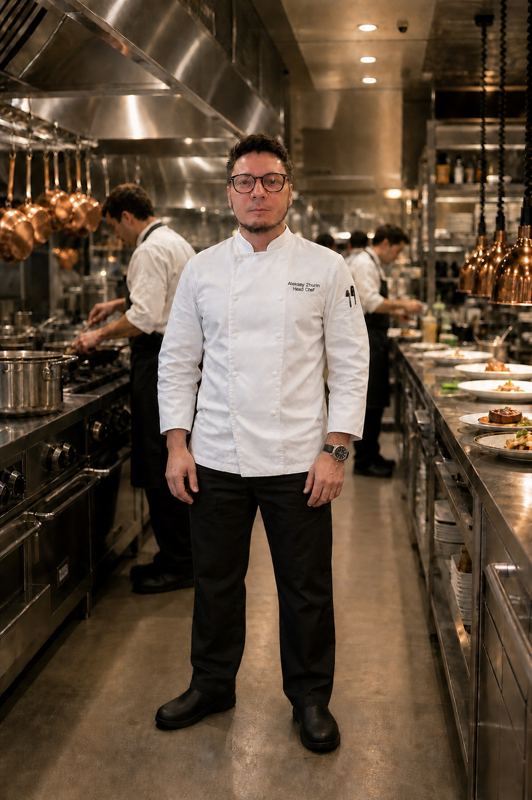
Aleksey Zhurin

Founder of KindyMenu

30+ years as a head chef · Food Safety Supervisor

Aleksey Zhurin, Head Chef

I spent more than 30 years in restaurants and hotels, as a head chef and as a group executive chef. I know how a professional kitchen is run, and what matters when food is prepared: a clear process, a record someone else can read, and no step left to memory.

Read the full story

After my child was born, I changed careers and went to work in a childcare kitchen. The work there was still on paper, written on a knee. Thousands of sheets, and they get lost. Handwriting is hard to read. You cannot tell who wrote what.

I looked for a program made for childcare kitchens. I did not find one in Australia or New Zealand. So I built KindyMenu myself. It follows the way a head chef thinks. The menu, the allergy, the cost and the food-safety record sit in one place. A cook can read them on the day, and a parent can see the week.

Write to Aleksey

Write to Aleksey

Try demoFree trial